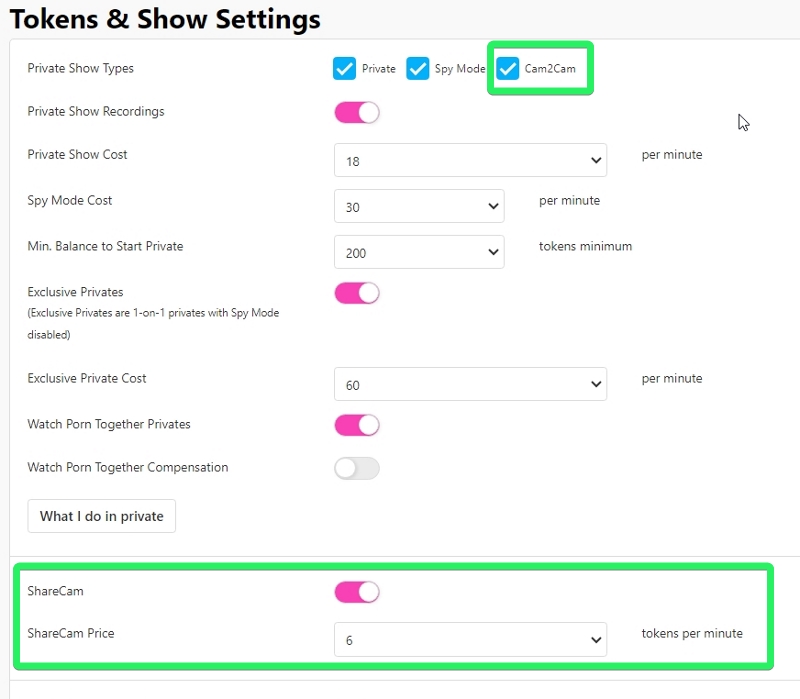
Models can enable or disable Cam2Cam and Share Cam for guests in their room.
About Share Cam and Cam2Cam:
- Cam2Cam, an optional included feature during private chats, offers a one-on-one video call with full audio, and no extra fee for members. It is included in the cost of your Private.
- Share Cam, for public chats (including Golden Ticket shows), allows members to share video without audio directly with you (the model) for a per-minute fee. When a member shares their cam in public chat, you'll receive a prompt to accept or decline. The Share Cam can be ended anytime by either party, or will end automatically if the user runs out of tokens.
- Both Cam2Cam and Share Cam windows can be resized.
To adjust settings and pricing for these features, visit the Settings & Privacy menu under Tokens & Show Settings on both desktop and mobile. Be sure to scroll down and tap Save to update your settings!